
The AI Image Editor lets you make targeted changes to a generated image using plain-language instructions — such as changing a wall colour, swapping props, or removing background elements. This article explains how to write effective prompts and apply edits without touching the product itself.
Platform: WizStudio | Who is this for: Designers & Admins
Table of Contents
| Sections | Topics |
| A | Edit with Prompt |
| B | FAQs |
Before You Begin
- You must have access to WizStudio
- Have the product image you want to edit ready to upload
- If you are editing an image generated from the Lifestyle Generator, you can use that image directly, no need to re-upload from your device
A. Edit Images With Prompt
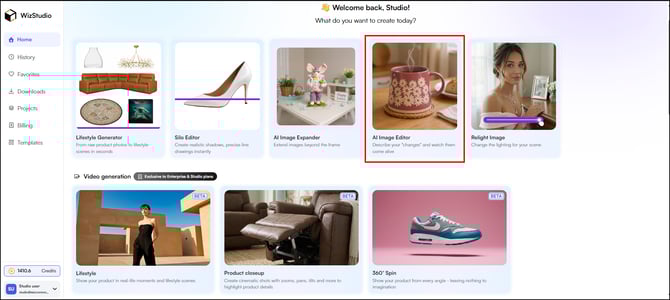
-
Upload your product image. To understand better, let’s change the color of the product image (sofa) that we created using the Lifestyle Generator.
-
Type your edit instruction in the prompt box (e.g., "Convert the color of the sofa to forest green")
-
Click Generate Variations
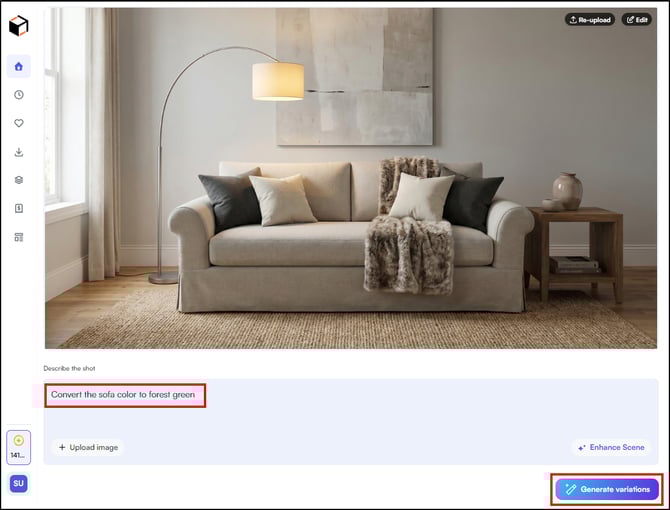
-
Select a variation and edit further if needed, following the same workflow as the Lifestyle Generator
FAQs
1. Can I use Edit with Prompt on any product image, or only images created in WizStudio?
A. You can upload any product image, it does not have to be generated in WizStudio. The feature works on images you upload directly from your device as well.
2. Why did my edit not match what I described in the prompt?
A. AI-generated results depend on how clearly the instruction is written. Instead of a broad description like "change the color," try something more specific, for example, "convert the sofa to forest green with a matte finish." If the first set of variations does not match your intent, refine your prompt and generate again.
3. Can I edit a variation further after selecting it?
A. Yes. Once you select a variation, you can continue editing it using the same workflow available in the Lifestyle Generator, including background changes, lighting adjustments, and additional prompt edits.
Not finding what you need? Browse the WizCommerce Help Center, reach out to your Customer Success Manager, or contact our Support Team.