
AI Co-Workers are standalone, agentic workflows built into the WizCommerce platform that automate specific wholesale jobs from end to end.
WizCommerce currently offers two AI Co-Workers: the AI Order Entry Assistant (automates inbound PO processing into ERP-ready orders) and the AI Sales Copilot (gives sales reps a chat-based interface to query customer data, surface insights, and take action in real time). No separate login or app is required for any of them.
Platform: AI Co-Workers | Who is this for: Admins
Table of Contents
| Section | Topics |
| A | What Are AI Co-Workers? |
| B | Who Uses AI Co-Workers? |
| C | Available AI Co-Workers |
| D | Access AI Co-Workers |
| E | Find Your Way Around AI Co-Workers |
| F | AI Sales Copilot Interface |
| G | FAQs |
A. What Are AI Co-Workers?
AI Co-Workers are agentic workflows designed to take full ownership of a clearly defined wholesale task, such as order entry, quote creation, or sales support, and execute it automatically within WizCommerce. They operate on top of WizCommerce's core products and are deeply integrated into real wholesale workflows.
The goal is to eliminate manual, repetitive tasks so your team can focus on higher-value work that requires human judgment and relationship-building.
B. Who Uses AI Co-Workers?
| Role | How They Use AI Co-Workers |
|---|---|
| Operations Teams | Use the AI Order Entry Assistant to eliminate manual PO processing, data entry, and quote building |
| Sales Reps | Use the AI Sales Copilot to get instant answers on customers, orders, and products — and take action without navigating multiple screens |
| Sales Managers | Use the AI Sales Copilot to monitor team performance, follow-up priorities, and account activity at a glance |
C. Available AI Co-Workers
WizCommerce currently offers two AI Co-Workers integrated into your platform:
1. AI Order Entry Assistant
What It Does: The AI Order Entry Assistant reads incoming purchase orders from emails, PDFs, spreadsheets, scanned documents, or images and converts them into clean, structured, ERP-ready orders — automatically. It handles data extraction, normalization, validation, and submission without any manual re-keying.
Why it Matters: Order entry is one of the biggest sources of manual effort and errors in wholesale operations. The AI Order Entry Assistant removes this bottleneck entirely, reducing order processing time from hours to minutes.
How It Works
| Step | Description |
|---|---|
| Captures Incoming POs | Reads RFQs and POs from emails, PDFs, spreadsheets, scanned documents, voice messages, and handwritten documents |
| Extracts Line Items | Pulls SKUs, descriptions, quantities, pricing, and customer details from any format — even when customers use their own naming conventions |
| Flags Incomplete or Inconsistent Data | Detects missing fields, mismatched SKUs, wrong pricing, and unclear information before submission |
| Validates Data Accuracy | Cross-checks all details against ERP data, price lists, and inventory |
| Creates ERP-Ready Orders | Generates a clean, structured sales order directly inside your ERP — formatted to match your required fields and defaults |
| Sends Confirmations | Emails order confirmation to the customer and sales rep once the order is confirmed / approved by the Admin |
2. AI Sales Copilot
What It Does: The AI Sales Copilot gives sales reps a ChatGPT-like interface to query customer data, orders, pricing, and products in natural language. Reps can ask questions, surface insights, and take action, such as checking order history, generating recommendations, creating quotes, or preparing follow-ups, without navigating multiple screens or systems.
Why it Matters: Sales reps spend too much time searching for information instead of selling. The AI Sales Copilot acts as a real-time assistant embedded directly in the flow of work, helping reps get answers and complete tasks faster.
What the AI Sales Copilot Can Do
Prepare for Every Customer Interaction
- Generate a full customer summary before a meeting (recent orders, quotes, open carts, activity)
- View pending quotes, open orders, and suggested next actions instantly
- Understand which products a customer has added to wishlists or ordered most frequently
Know Who to Follow Up With and When
- Identify customers who need follow-ups today based on inactivity, order gaps, or region
- Surface customers affected by recent inventory changes (e.g., out-of-stock items in their wishlists)
- Prioritize accounts with open or expiring quotes
Take Action Without Leaving the Flow
- Create quotes and orders during live customer conversations
- Build and share product catalogs on the road
- Find in-stock alternatives for out-of-stock items instantly
- Discover upsells and complementary products by SKU or category
Check Order and Delivery Status
- Get instant answers on delivery status, shipment updates, and delayed orders without contacting customer service
D. Access AI Co-Workers
AI Co-Workers are integrated directly into your WizCommerce platform. No separate login or app required.
Where to Find the AI Order Entry Assistant
-
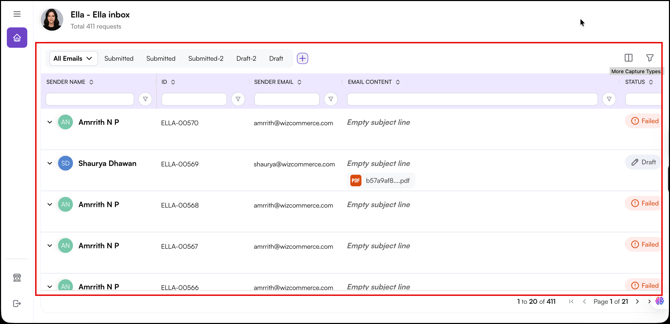
Admin Dashboard: Access the AI Order Entry Dashboard at AI Order Entry Dashboard to monitor and review processed orders.
-
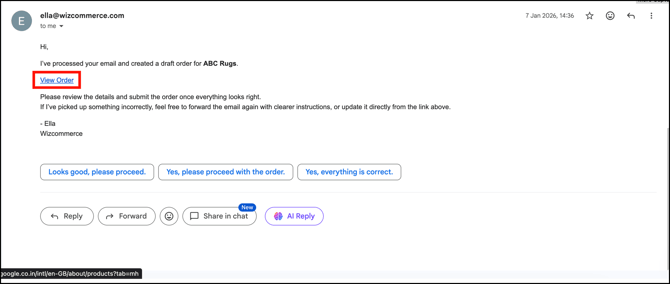
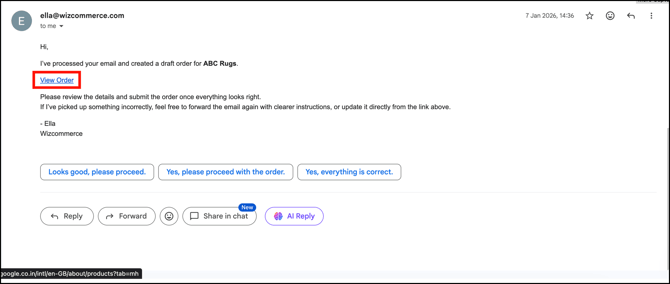
Email Link: Click the link in the order processing email to view extracted order details.
-
Dashboard: Monitor processed orders and review submitted orders.
Where to Find AI Sales Copilot
Access the AI Sales Copilot from:
-
WizOrder App: Copilot button in the top right corner.

-
Web Portal: Copilot button in the top right corner.

-
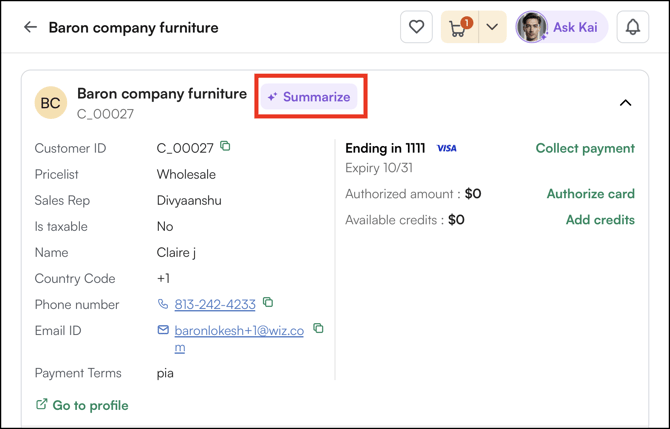
Click Summarize to see customer specific information / history.
E. Finding Your Way Around AI Co-Workers
AI Order Entry Assistant Interface
-
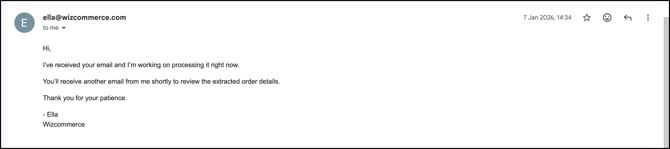
Inbox View: View order processing progress.
-
AI Order Processed View: Preview all the data extracted by the AI.
- Processing Status: Shows the current state of each order (draft, submitted, or failed).
F. AI Sales Copilot Interface
Chat Window Type questions or commands in natural language.
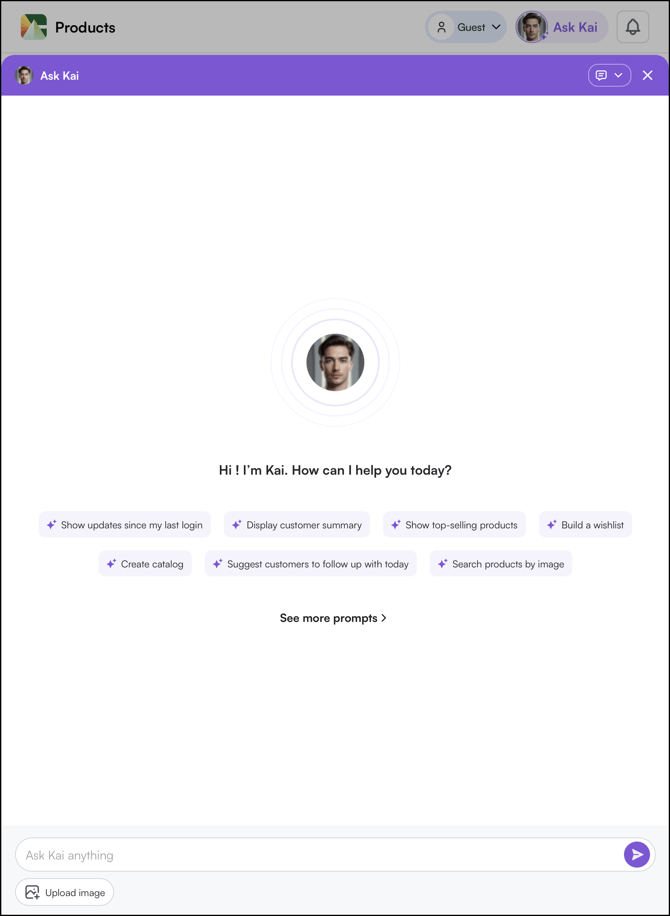
Quick Actions: Pre-built prompts for the most common rep tasks:
- Find customer order history
- Check product inventory
- Generate product recommendations
- Create quotes
- Search for products
- Check order or delivery status
FAQs
1. Do AI Co-Workers require a separate login or app?
A. Yes, the AI Order Entry Assistant has its own dashboard at ella-order.wizcommerce.com, and the AI Sales Copilot is accessible via a button on any page in WizOrder (app or web portal).
2. What formats can the AI Order Entry Assistant read?
A. It can read incoming documents in any format — emails, PDFs, spreadsheets, scanned documents, images, and attachments. AI Order Entry Assistant extract structured data automatically regardless of how the customer sent the PO, including when customers use their own non-standard SKUs or product descriptions.
3. Can the AI Sales Copilot take action, or does it only answer questions?
A. It can do both. Beyond answering questions, the AI Sales Copilot can create quotes and orders, build and share product catalogs, find in-stock alternatives for unavailable items, and identify upsell opportunities — all directly from the chat interface, without navigating to separate screens or systems.
4. Which teams benefit most from each AI Co-Worker?
A. The AI Order Entry Assistant is primarily used by Operations teams to eliminate manual PO processing. The AI Sales Copilot is primarily used by Sales Reps to get instant customer context, identify follow-up priorities, and move deals forward faster. Sales Managers can also use the Copilot to monitor team performance and account activity across the business.
Not finding what you need? Browse the WizCommerce Help Center, reach out to your Customer Success Manager, or contact our Support Team.