
WizStudio supports multiple users and workspaces, allowing teams to collaborate on image projects and manage access at the workspace level. This article explains how to invite team members, switch between workspaces, and manage workspace settings.
Platform: WizStudio | Who is this for: Admins
Table of Contents
| Section | Topics |
| A | Invite a Team Member to WizStudio |
| B | Change a Team Member's Role |
| C | Role & Permissions |
| D | FAQs |
Before You Begin
- You must have Admin access in WizStudio to invite team members and manage roles
- Only work email addresses can be used to send invitations, personal email addresses are not accepted
- Decide whether the new member needs Admin or Member access before inviting (see Section C for role permissions)
A. Invite a Team Member to WizStudio
Invitations are sent by email. Once accepted, the team member can access the shared workspace based on the role you assign.
-
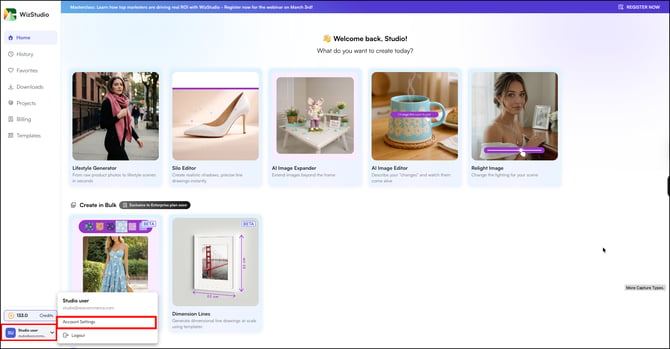
Click the Settings icon at the bottom left of the page
-
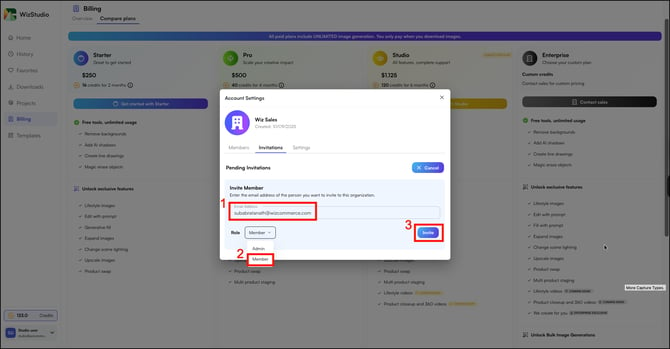
Go to Invitations
-
Select their role from the dropdown, Admin or Member
-
Click Invite
-
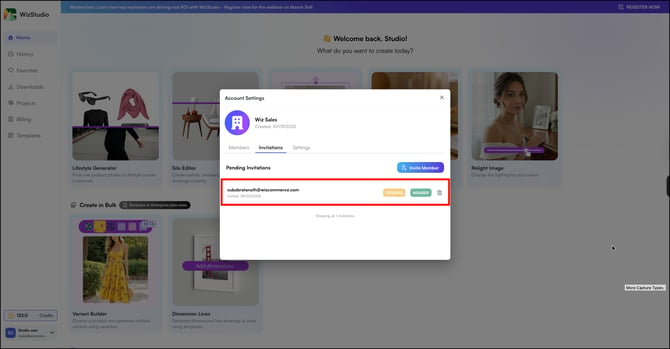
The invitation is sent immediately. You can view all pending and sent invitations on the same page.
B. Change a Team Member's Role
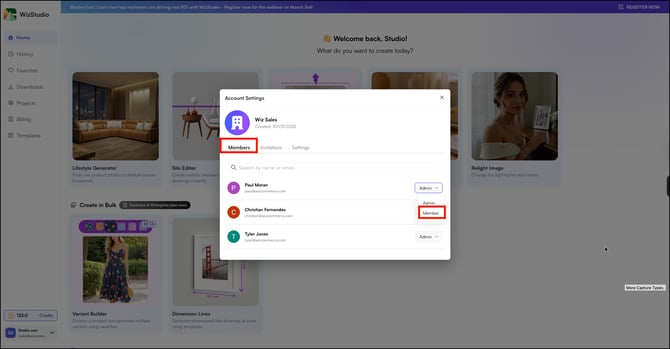
You can change a team member's role in the members section.
-
Click the Settings icon and go to Members
-
Find the team member whose role you want to update
-
Select the new role from the dropdown, Admin or Member. The role updates immediately
C. Roles & Permissions
Use this reference to decide which role to assign when inviting a new team member.
|
Role |
What They Can Do |
|---|---|
|
Admin |
Full access, manage billing, invite members, and generate images |
|
Member |
Generate and download images within the shared workspace |
Note: Changing a team member from Admin to Member removes their ability to manage billing and invite others. The change takes effect immediately.
FAQs
1. Can I invite someone using a personal email address?2. What happens if a team member has not accepted their invitation?
3. Can I remove a team member from WizStudio?
A. Yes. Go to Settings → Members, find the team member, and remove them from the workspace. Their access is revoked immediately.