
Discounts can be applied directly during order entry, either to a specific product in the cart or to the entire order value, and the process works the same way on both the mobile app and the web portal.
This article covers how to apply line-level discounts to individual products and cart-level discounts across the full order.
Platform: WizOrder | Who is this for: Admins & Sales Reps
To Get There: Cart > Product Card > Three-dot Menu > Offer Discount
Table of Contents
| Sections | Topics |
| A | Apply Discounts to Your Order |
| B | Cart-Level Discounts |
| C | FAQs |
Before You Begin
- Ensure you have access before applying discounts during order entry.
- Discounts can be applied the same way on both the mobile app and the web portal.
A. Apply Discounts to Your Order
Line-Level Discounts
A line-level discount applies to a specific product in the cart — not the entire order. Use this when you want to offer a one-off discount on a particular item without affecting other products in the cart.
On the Web Portal:
- Go to the Cart and select the product to apply the discount.
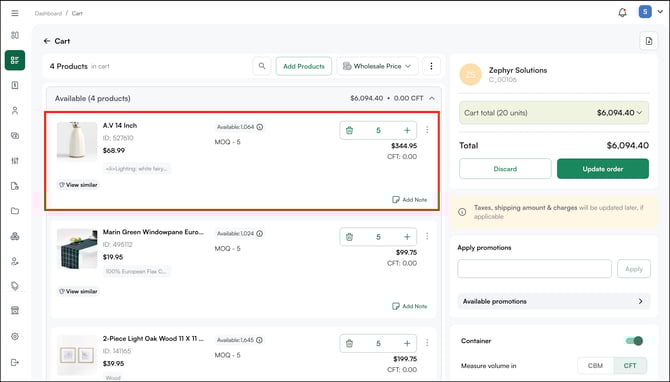
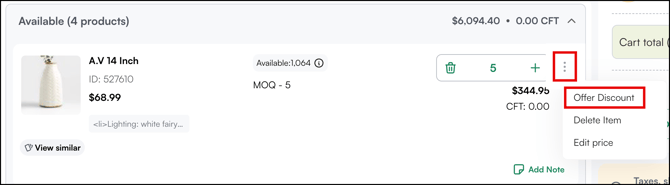
- Click the three-dot menu at the top right corner of the product card.
- Select Offer Discount.
- Choose the discount type:
- Percentage: Discounts the unit price by a percentage (e.g., 10% off)
- Price: Deducts a fixed dollar amount from the unit price
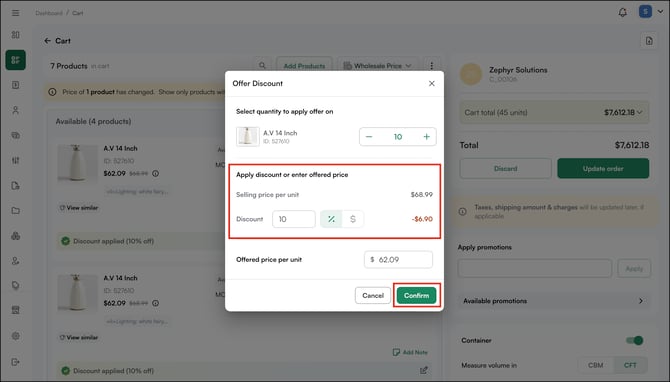
- Enter the discount value and confirm.
- Click Update Order.
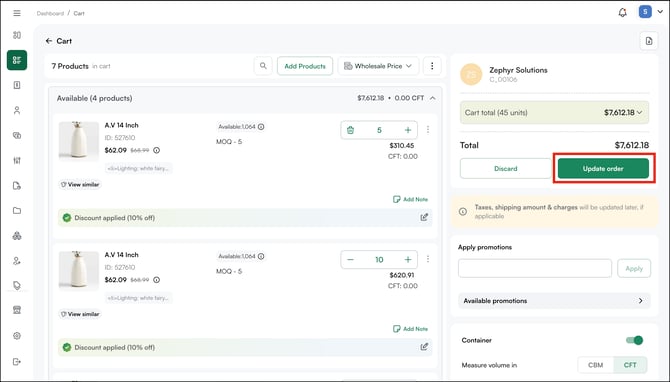
The discount applies to the unit value of that product only. All other products in the cart remain at their original prices.
B. Cart-Level Discounts
A cart-level discount applies to the total value of the entire order. Use this for volume incentives, loyalty rewards, or promotional pricing across the full cart.
- From the order confirmation page, click Add Discount.
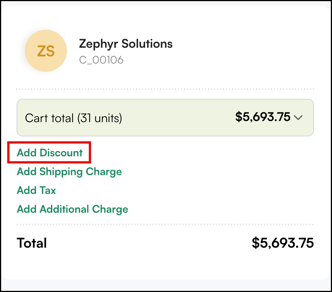
- Choose the discount type:
- Percentage: Discounts the total cart value by a percentage (e.g., 10% off the entire order)
- Price: Deducts a fixed dollar amount from the cart total
- Enter the discount value and click Apply.
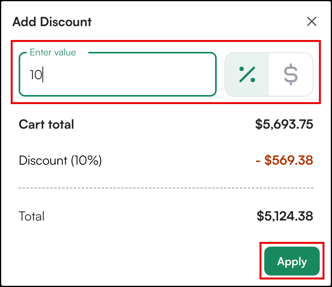
- The cart-level discount reflects in the order summary.
- Click Submit Order to place the order once all discounts are applied.
Note: The order confirmation page also lets you review customer details (such as name, billing address, and shipping address) and fill in order details such as PO number, shipment date, shipping method, and payment terms before submitting.
FAQs
1. What is the difference between a line-level discount and a cart-level discount?
A. A line-level discount applies to a specific product in the cart only — it does not affect other items. A cart-level discount applies to the total value of the entire order. Use line-level discounts for one-off product deals and cart-level discounts for volume incentives or loyalty rewards.
2. Can I apply both a line-level and a cart-level discount to the same order?
A. Yes. You can apply a line-level discount to one or more individual products and also add a cart-level discount on the same order. Both discounts will reflect in the order summary before you submit.
3. Does applying a discount during order entry require admin access?
A. No. Both admins and sales reps can apply discounts during order entry — on the mobile app and the web portal. The process is the same for both roles.
Not finding what you need? Browse the WizCommerce Help Center, reach out to your Customer Success Manager, or contact our Support Team.