
WizStudio is WizCommerce's AI-powered product imagery platform. It generates catalog-ready lifestyle images, silo shots, line drawings, product variants, and short videos from a single raw product photo, without photoshoots, models, or studio coordination. This article covers the WizStudio interface, the left sidebar, dashboard tools, and available image generators, so you know where everything is before you start.
Built for manufacturers, wholesalers, and retailers managing 100 to 10,000+ SKUs, WizStudio lets teams launch products faster, update catalogs at scale, and maintain consistent visual quality across every channel.
Platform: WizStudio | Who is this for: Admins & Designer
Table of Contents
| Sections | Topics |
| A | What is WizStudio? |
| B | Who uses WizStudio? |
| C | How WizStudio Works |
| D | What WizStudio Can Do |
| E | Access WizStudio |
| F | FAQs |
A. What is WizStudio?
WizStudio is an AI catalog and product imagery platform that delivers studio-quality images without traditional photoshoots. Teams upload a raw product photo, choose a scene style or describe their vision, and receive catalog-ready visuals in minutes, with colors, textures, proportions, and product details preserved with precision. No coordinating shoots, models, locations, or reshoots required.
→ Access WizStudio at studio.wizcommerce.com
B. Who uses WizStudio?
Marketing, Product, and E-commerce Teams use WizStudio to create and maintain professional product imagery at scale, without the traditional costs and delays of photoshoots. It is purpose-built for teams managing large catalogs across multiple product categories.
C. How WizStudio Works
WizStudio turns raw product photos into catalog-ready visuals in 3 steps:
Step 1 : Upload Your Product Photo
Drag and drop any raw product shot. Basic showroom or warehouse images work — no studio setup needed.
Step 2: Choose a Style or Describe Your Vision
Pick from ready-made scene styles or enter a simple text prompt (e.g., "a vase in a cozy bedroom" or "a plate on an ivory table"). WizStudio handles lighting, environment, and composition automatically.
Step 3: Get Studio-Quality Images Instantly
Download lifestyle-ready visuals optimized for catalogs, merchandising, and online sales.
D. What WizStudio Can Do
1. Core Image Generation Tools
| Tool | Description |
|---|---|
| Lifestyle Generator | Transform raw product photos into styled lifestyle scenes in seconds, full scenes with accurate lighting, environment, and context |
| Silo Shot Generation | Remove backgrounds, correct lighting and color, add clean white or custom backdrops, and generate realistic shadows, all in one streamlined workflow |
| Variant Builder | Choose a product and generate multiple variants from a single photo using swatches, showcase your full range without photographing every SKU |
| Multi-Product Staging | Create scenes with multiple products in a single frame, ideal for showcasing full collections and merchandising exactly the way buyers expect |
| Line Drawings / Dimension Lines | Generate clean, precise technical drawings and dimensional line drawings at scale using templates, ideal for spec sheets, product pages, and wholesale catalogs |
| Image-to-Video Generator | Turn product photos into 3-8 second AI-generated videos, short scenes, 360° spins, or subtle product animations that increase buyer engagement |
2. Image Editing Tools
Beyond generation, WizStudio includes a full suite of editing tools to refine and enhance images after creation:
| Tool | Description |
|---|---|
| AI Image Editor | Describe your changes in plain text and watch them apply to the image |
| AI Image Expander | Extend images beyond the original frame |
| Relight Image | Change the lighting for any scene after it's been generated |
| Remove / Add Background | Clean up backgrounds or swap them out entirely |
| Upscale Image | Increase image resolution for high-quality print or digital use |
| Generative Fill | Fill empty or selected areas of an image using AI |
| Magic Erase | Remove unwanted objects or elements from a scene |
E. Access WizStudio
WizStudio is a web-based platform organized around image creation workflows.
Here's how to find your way around.
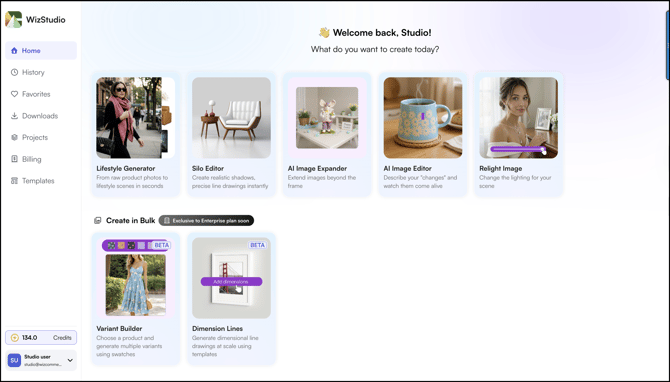
The Left Sidebar
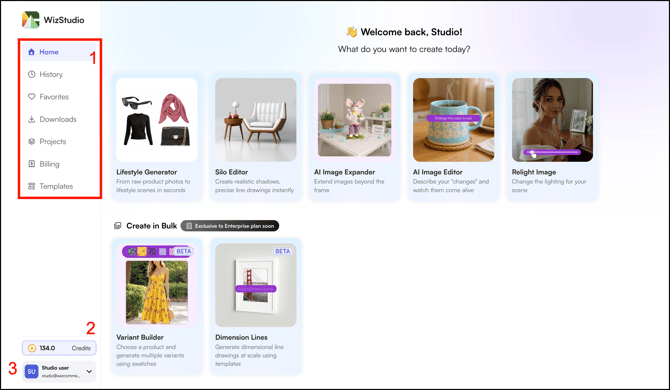
Navigation Menu:
| Menu Item | Description |
|---|---|
| Home | Access image generation tools and recent projects |
| History | View all previously generated images |
| Favorites | Quick access to your starred images |
| Downloads | Find all images you've downloaded |
| Projects | Organize images by project or campaign |
| Billing | Manage credits and subscriptions |
| Templates | Browse pre-built image styles and scene setups |
Credits Display: Shows your available credits for image generation.
User Profile: Access account settings and switch between workspaces.
Main Dashboard
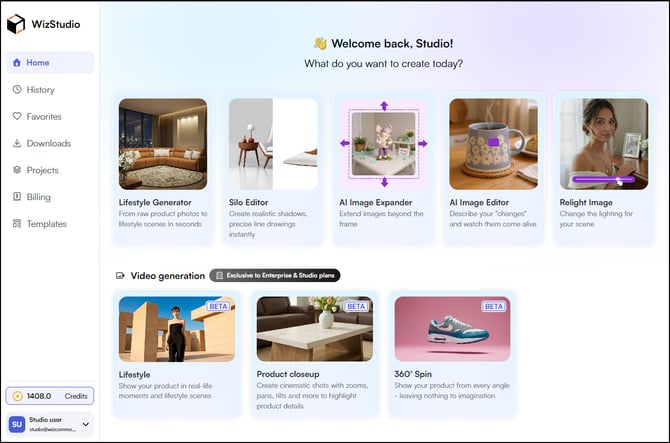
The home screen shows all available AI tools for generating and editing product images:
| Tool | Description |
|---|---|
| Lifestyle Images | Transform raw product photos into lifestyle scenes in seconds |
| Silo Editor | Create realistic shadows and precise line drawings instantly |
| AI Image Expander | Extend images beyond the original frame |
| AI Image Editor | Describe your changes in text and watch them apply |
| Relight Image | Change the lighting for your scene |
| Lifestyle Videos | Turn product images into dynamic lifestyle video scenes instantly |
| Product Close-Up | Generate detailed close-up shots that highlight product textures and features |
| 360° Spin | Create a full 360-degree rotating view of your product automatically |
| Variant Builder | Generate multiple product variants using swatches |
| Dimension Lines | Generate dimensional line drawings at scale using templates |
FAQs
1. What type of product photo do I need to upload to use WizStudio?
A. No professional photography setup is required. WizStudio works with basic raw product shots, including showroom or warehouse images, as long as the product is clearly visible. Once uploaded, WizStudio handles background removal, lighting correction, and scene generation automatically.
2. Can I show different color or material variants of a product without separate photoshoots?
A. Yes. The Variant Builder lets you select a product and generate multiple variants using swatches, so you can showcase your full product range without photographing every individual SKU. This significantly reduces the time and cost of maintaining a complete catalog.
4. Does WizStudio support video output, not just images?
A. Yes. The Image-to-Video Generator converts product photos into short 4-8 second AI-generated video clips including scene animations, 360° spins, and subtle product motion. These are designed to increase buyer engagement on storefronts and in digital catalogs.
5. Why does my WizStudio account say 'expired' when my plan is still active?
A. Your account shows as expired because all your WizStudio credits have been used up. Generations are blocked once credits run out, even if your plan's end date hasn't arrived yet. To continue generating images, top up or renew your credits or contact our support team.
6. How does billing and credit renewal work for WizStudio monthly plans?
A. By default, monthly plans are on auto-renewal. At renewal, you are charged for the new cycle and credits are added to your account automatically. Unused credits roll over as long as your plan stays active, so renewal credits are added on top rather than replacing them. If auto-renewal is turned off for your account, this won't happen automatically. You can check your billing history under Billing in the WizStudio platform.
Still need help? Reach out to our support team at help@wizcommerce.com.