
You can download all your customers, along with their addresses and contacts, from the Import - Export page in a few clicks. The export comes as a single Excel file, or as a zip file if you have a large number of customers.
» To export customers
- Go to Manage > Import - Export.
- Select the Customers tile and click Export.
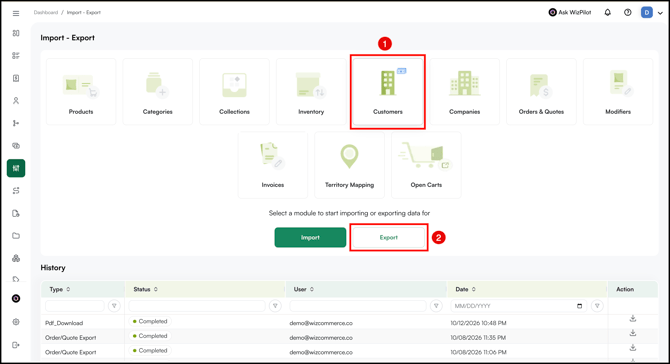
- Once the export is ready, click the notification icon at the top right and download the file.
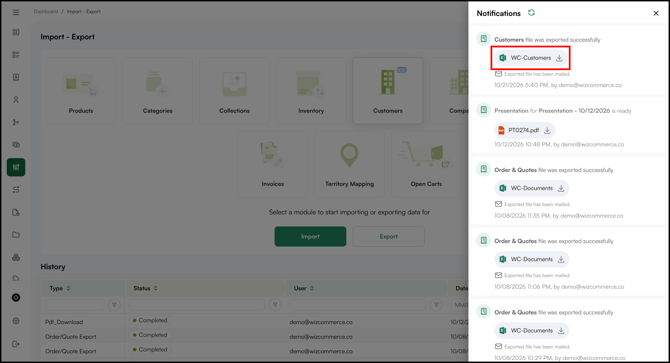
- Open the downloaded file. If it downloaded as a zip file, extract it first and open each file inside.
- Go to the Customers tab to view your customer data.
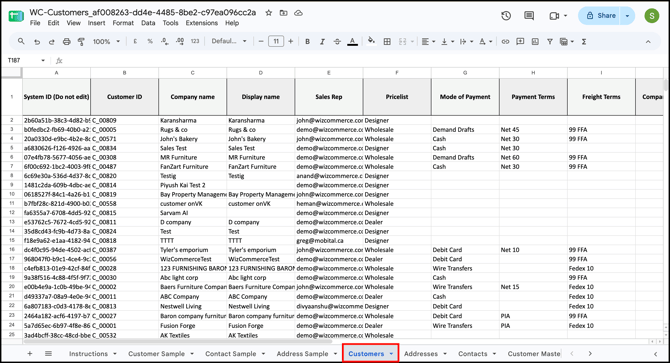
Note: Any custom fields added to your Customer, Address, or Contact forms appear as extra columns on their respective tabs.
» Important things to know
-
Why did my file download as a zip? When you have a large number of customers, WizCommerce splits the export into multiple files and bundles them into a zip. Extract the zip and open each file. Each one has the same tab structure.
-
The file is not sent as an email attachment. You will find a download link in the notification bar once the export is complete.
-
Large exports can take a few minutes. If you have thousands of customers, wait for the export to finish before downloading. If it stays in progress for an unusually long time, contact our support team.
-
Planning to update customers and re-import? Edit the Customers, Addresses, or Contacts tabs only. The Customer Master Sheet is for review only and can’t be used for import. For the full update steps, see Import and Update Customers in Bulk.
» Tips to avoid issues
- Do not edit the System ID column if you plan to re-import the file. WizCommerce uses it to match each row to the right record.
- Do not rename or delete tabs or column headers in the Excel file.
Still need help? Reach out to our support team at help@wizcommerce.com.