
WizPilot's Knowledge Base lets you upload your own internal documents (like policies, SOPs, product guides, pricing rules, compliance material) so WizPilot can answer questions from them, with a citation showing exactly which document the answer came from.
This article covers who can upload documents, how they are organized, and how WizPilot answers from them.
Platform: WizOrder | Who is this for: Sales Reps & Admins
To get there: WizOrder → Ask WizPilot
Table of Contents
| Sections | Topics |
| A | What is the Knowledge Base? |
| B | Where to Find Knowledge Base |
| C | Upload & Manage Documents |
| D | Get Answers From Your Documents |
| E | FAQs |
A. What is the Knowledge Base?
The Knowledge Base is where you give WizPilot access to your own business material, the things a rep would otherwise have to dig up from a shared drive, a wiki, or a colleague. Once uploaded, WizPilot can answer questions from those documents the same way it answers questions from your order and customer data.
The goal is to remove the guesswork: instead of a rep improvising an answer to “what's our return policy for damaged goods?”, WizPilot answers from the actual policy document and tells you where the answer came from.
B. Where to Find Knowledge Base
-
Open the WizPilot side menu and select Knowledge Base.
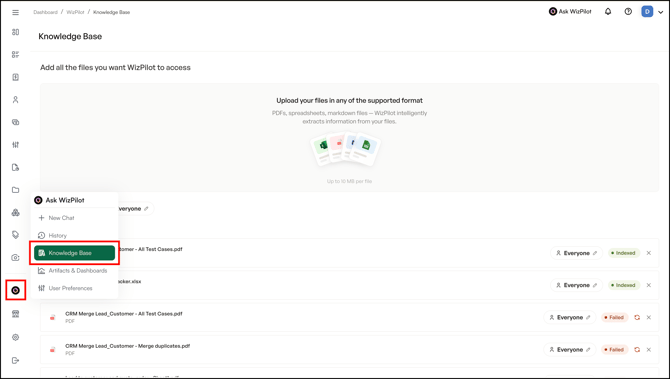
Note: Knowledge Base is a desktop and web feature at this release. It isn't yet available from the WizPilot mobile or tablet app.
C. Upload & Manage Documents
When you upload a file to the Knowledge Base, you control who can query it. This is set in two places:
1. New Uploads Visible To
-
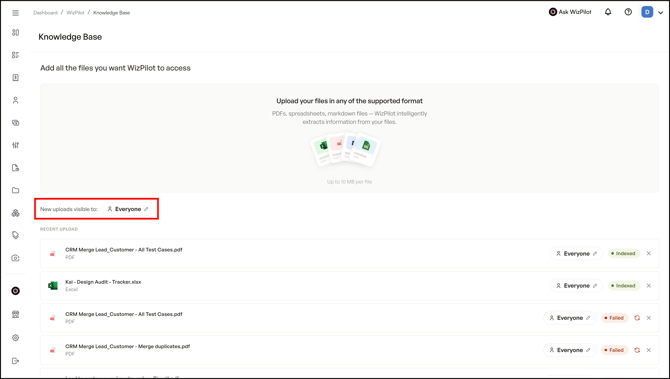
This is your default visibility setting. It applies automatically to every file you upload from that point on, until you change it.
-
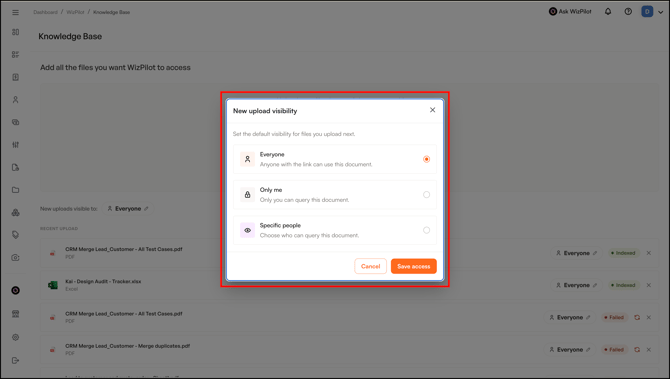
To update it, select New uploads visible to and choose one of three options:
| Option | What it Means |
|---|---|
| Everyone | Anyone with the link can use this document |
| Only me | Only you can query this document |
| Specific people | Choose exactly who can query this document |
2. Document Access
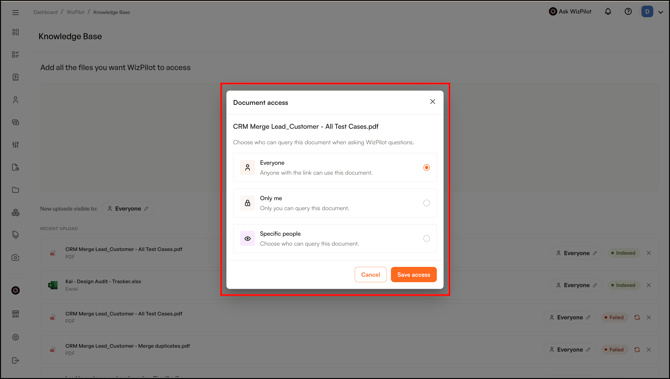
Need to change visibility for a file you have already uploaded? Open Document access from that file's row and choose from the same three options — Everyone, Only me, or Specific people. This overrides the default for that one document only; it doesn't change your setting for future uploads.
- Each file in your upload list also shows its current visibility, along with a status — Indexed once WizPilot can query it, or Failed if something went wrong (with an option to retry or remove the file).
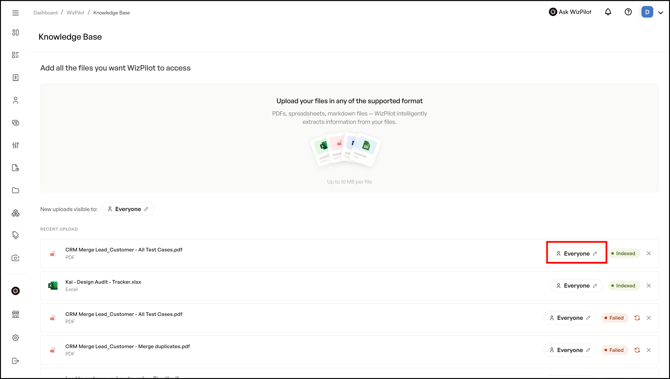
- Select one of the three options, then click Save Access.
D. Get Answers From Your Documents
Once a document is in the Knowledge Base, just ask WizPilot the question directly the same way you'd ask about an order or a customer. For example, asking “what's our return policy for damaged goods?” returns an answer sourced from the uploaded policy document, with a citation showing which document it came from.
That citation is worth paying attention to: it's how you confirm WizPilot is answering from your actual material rather than guessing.
FAQs
1. Who can upload documents to the Knowledge Base?
A. Both reps and admins can upload material.
2. How do I know WizPilot's answer is actually coming from our documents, and not made up?
A. Every answer sourced from the Knowledge Base includes a citation showing exactly which document it came from, so you can verify it directly.
3. Can I control who's able to query a document I upload?
A. Yes. Every upload has a visibility setting (Everyone, Only me, or Specific people) that determines who can query it. You can set a default for all your future uploads under New Uploads Visible To, or set it per file under Document Access.
4. Can I change a document's visibility after I have already uploaded it?
A. Yes, open Document Access on that file and choose a new setting. This only changes access for that one file. It won't affect your default for future uploads.
5. Can I use the Knowledge Base from my phone?
A. Not yet. Knowledge Base is available on desktop and web at this release; mobile and tablet support is not yet live.
Still need help? Reach out to our support team at help@wizcommerce.com.