
WizShop is WizCommerce's AI-first B2B ecommerce platform. It is a buyer-facing online storefront where wholesale buyers can browse products, view customer-specific pricing, place orders, and manage their accounts independently. This article covers what buyers see on the storefront, how admins manage leads and website users, and how WizShop differs from WizOrder.
This article covers what buyers see on the storefront, how admins manage leads and website users, and how WizShop differs from WizOrder.
Platform: WizShop | Who is this for: Admins
Table of Contents
| Section | Topics |
| A | What is WizShop? |
| B | Who uses WizShop? |
| C | Access WizShop |
| D | Finding Your Way Around WizShop |
| E | FAQs |
A. What is WizShop?
WizShop (also referred to as the Online Storefront) is a wholesale-native B2B ecommerce platform designed to give every buyer a personalized, self-serve buying experience — with customer-specific pricing, tailored product assortments, live inventory, and a smooth checkout, every time. It is not adapted from consumer ecommerce; it is built specifically for how wholesale businesses sell and how wholesale buyers shop.
B. Who uses WizShop?
Wholesale Buyers use the Online Storefront to browse products, view personalized pricing, place orders, and manage their accounts through a self-serve experience.
Business Admins use the admin backend to manage the product catalog, configure customer accounts and pricing, and control storefront settings.
C. Access WizShop
For Buyers: WizShop is a web-based storefront available at your company's custom domain. Buyers log in using credentials provided during onboarding.
For Admins: The admin backend is accessible through the WizOrder web portal. → Admin Portal
D. Finding Your Way Around WizShop
WizShop has two main interfaces: the buyer-facing storefront and the admin backend.
1. For logged in Buyers
-
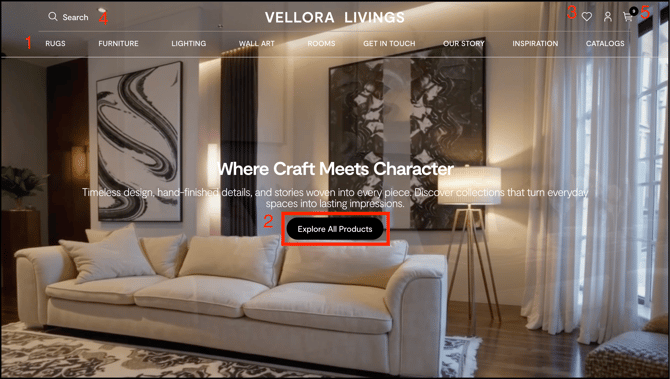
Home Page: Product browsing, featured collections, and categories
-
Product Pages: Detailed product information with customer-specific pricing, inventory availability, and AI recommendations (View Similar).
-
Wishlist: Save products for later or share with your sales rep
-
Search: Find products by name, SKU, and more.
-
Shopping cart: Review selected items, adjust quantities, and proceed to checkout.
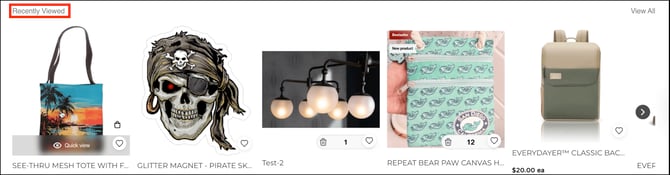
- Recently Viewed: Recently browsed products appear automatically at the top of Product Listing Pages (most recent first), persist even after logout/login, require no setup, and work on both the Sales Rep App (WizOrder) and the Online Storefront (WizShop).
2. For Admins
-
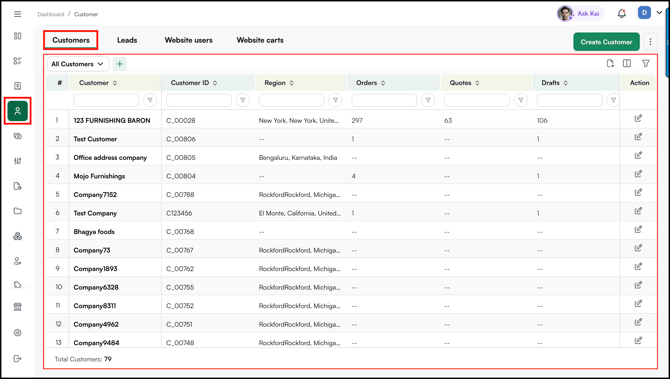
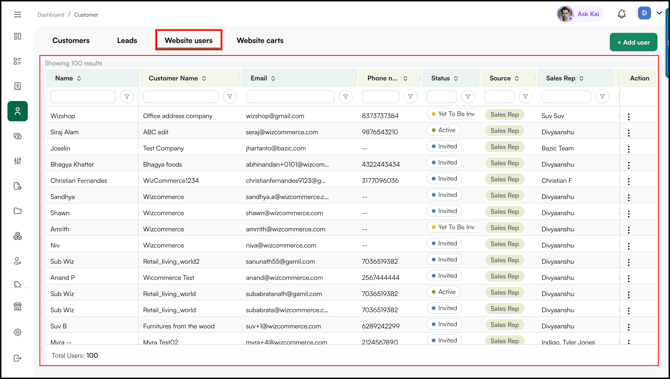
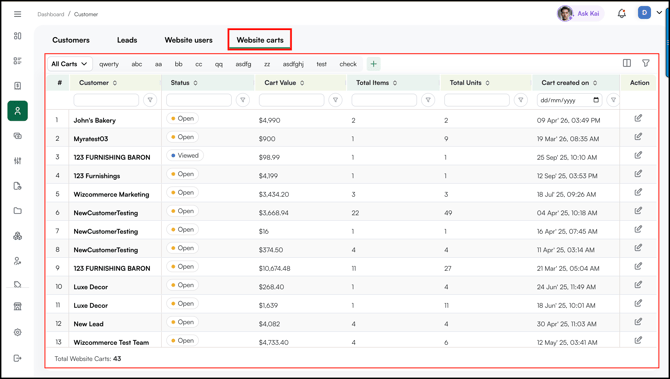
Sales tab: Access customer management, including Leads, Website Users, Abandoned Carts, and customer accounts. Manage registrations, approvals, and customer relationships.
-
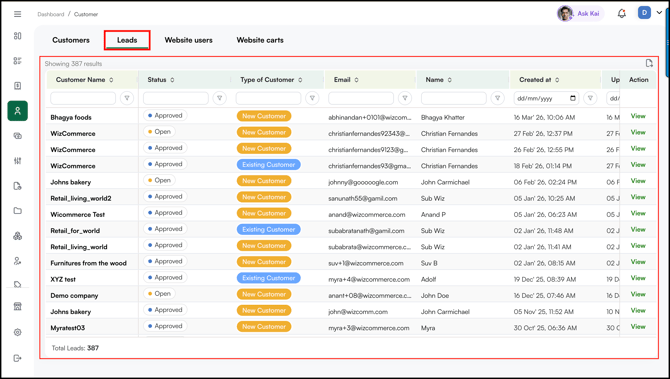
Leads: New customer registration requests awaiting approval. Review company details and contact information, then approve or reject applications.
-
Website User: Active customer accounts with storefront access. View login status, resend invitation links, reset passwords, and manage account permissions.
-
Website Carts: View items customers added but didn't purchase. Track which products were added, when, and the total cart value to follow up with customers.
FAQs
1. What is the difference between WizShop and WizOrder?
A. WizShop is the buyer-facing Online Storefront where wholesale buyers browse products and place orders on their own. WizOrder is the Sales Rep App used by reps to take orders on behalf of customers. Both share the same backend data, including pricing, catalog, and inventory, but serve different users and workflows.
2. How do buyers get access to WizShop?
A. Buyers access WizShop through your company's custom domain. Login credentials are provided during onboarding. Buyers cannot self-register without admin approval, new registration requests appear under Leads in the admin backend.
3. Does WizShop support different pricing for different customers?
A. Yes. WizShop is built for customer-specific pricing. Each buyer sees their own assigned pricing when browsing product pages, so no manual workarounds are needed.
Not finding what you need? Browse the WizCommerce Help Center, reach out to your Customer Success Manager, or contact our support team at help@wizcommerce.com.