
All previously generated catalogs are stored in one place, the Catalogs page under the Sales tab. Each catalog entry displays the catalog name, creation date, number of products, and current status. From here you can edit, share, download, or delete any catalog.
Platform: WizOrder | Who is this for: Sales Reps & Admins
To Get There: Sales > Catalogs
Table of Contents
| Section | Topics |
| A | Manage a Catalog |
| B | FAQs |
Before You Begin
- You must have access to WizOrder, on the mobile app or the web portal
- Catalogs must have been previously generated before they appear here, see Create and Share Product Catalogs if you need to create one first
A. Manage a Catalog
From the Catalogs page, click the three-dot menu next to any catalog to access the following options:
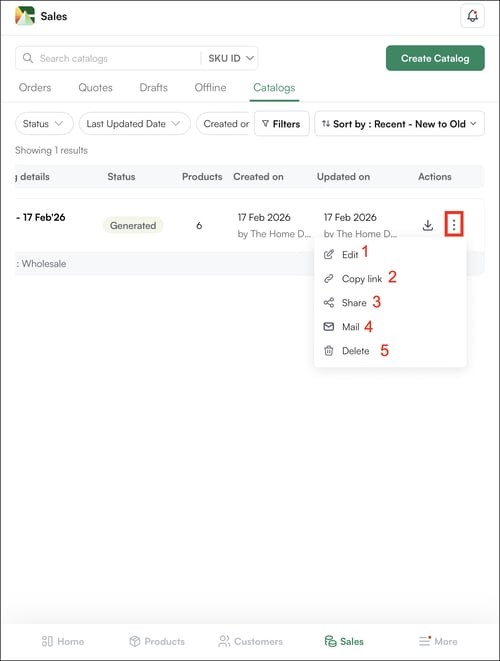
- Edit: Modify the catalog by adding or removing products, updating pricing visibility, adjusting inventory display, or changing other configuration settings
- Copy Link: Generate a direct PDF link for quick sharing
- Share: Send the catalog via email or WhatsApp, or create a shareable link
- Email: Send the catalog directly to a customer from the Sales Rep App (WizOrder)
- Delete: Permanently remove a catalog you no longer need
Tip: To download a catalog as a PDF, click the Download icon located next to the three-dot menu.
FAQs
1. Can I share a catalog with someone who does not have access to WizOrder?
A. Yes. Use Copy Link or Share to generate a direct PDF link or send via email or WhatsApp. The recipient does not need a WizOrder account to view the catalog.
2. What happens to a shared link if I delete the catalog?
A. The link stops working immediately. If customers have bookmarked or saved the link, they will no longer be able to access the catalog. Download and share the PDF directly if you need a permanent copy.
3. Can I edit a catalog after it has been shared?
A. Yes. Click Edit from the three-dot menu to modify the catalog at any time. Note that existing shared links point to the PDF generated at the time of sharing — if you need recipients to see the updated version, generate and share a new link after editing.
Not finding what you need? Browse the WizCommerce Help Center, reach out to your Customer Success Manager, or contact our Support Team.