
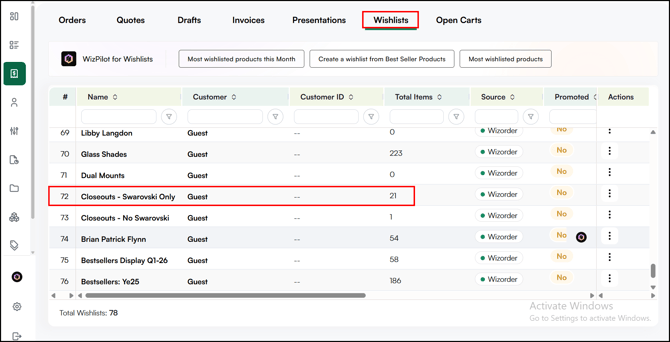
The number of products on the Wishlists page and the number you see inside a wishlist can be different. This is expected: the two counts are worked out in different ways, so the Wishlists page can show a higher number, even if nobody has edited the wishlist.
» Why the counts are different
- Wishlists Page (total items): shows the total number of products that were added to the wishlist. This number doesn’t change when a product’s status or price list changes later. So if a product becomes inactive, or is removed from the selected price list, it’s still included in this total.
- Inside the Wishlist: shows only the products you can currently use, meaning products that are active and available in the selected price list. If a product becomes inactive, or is removed from the price list, it no longer appears here, and the count goes down.
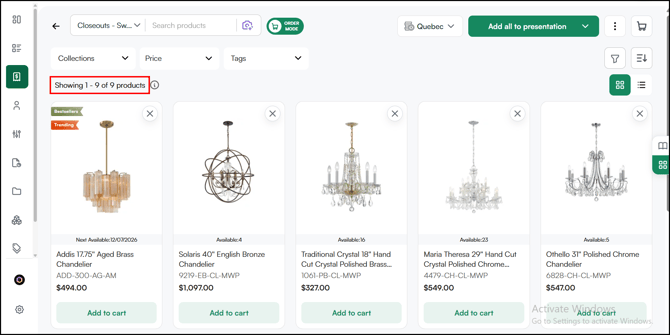
Note: This can affect any wishlist, including Guest wishlists.
» How to check which count you’re looking at
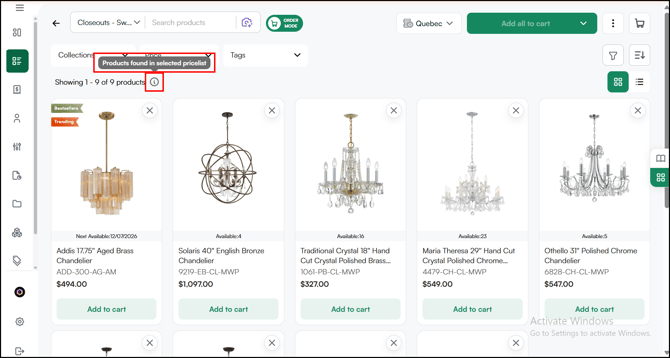
Inside the wishlist, hover over the i icon next to the product count. It shows Products found in selected pricelist, meaning the count only includes active products available in the selected price list.
→ For more on how price lists control which products customers see, see Pricelist Overview.
Still need help? Reach out to our support team at help@wizcommerce.com.