
Save a product to your Asset Library while you are creating a lifestyle image, so it's ready to reuse the next time you need it; no separate upload required.
Platform: WizStudio | Who is this for: WizStudio users
Before You Begin
- The Asset Library is available by default to all users on every plan.
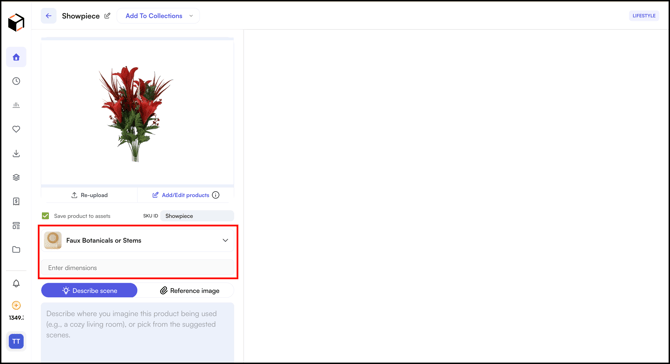
- You'll need to select a product category and enter dimensions as you normally would while creating the image.
- Each product must have a unique SKU ID. If a SKU ID already exists in the Asset Library, saving it again updates the existing product instead of creating a new one.
» Save Products While You Create
You can also add products to your library while creating a lifestyle image, so you do not need to upload them again next time.
- Go to WizStudio → Home → Lifestyle Generator
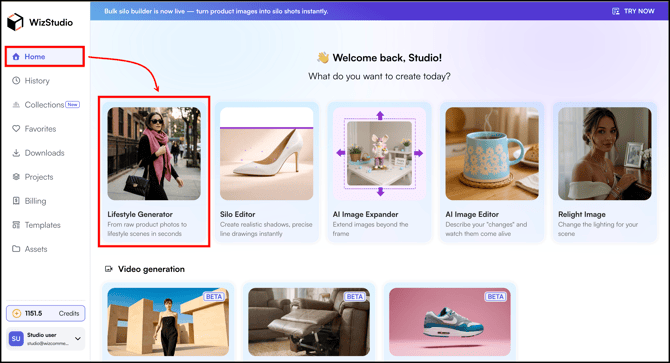
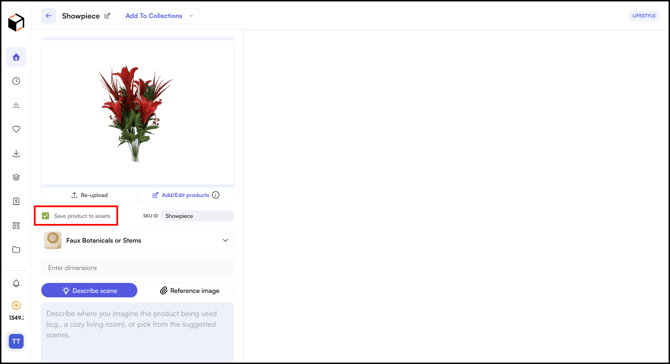
- Check the Save Product to Assets while creating a lifestyle image(s).
- Select a Product Category and enter the Dimensions as you normally would.
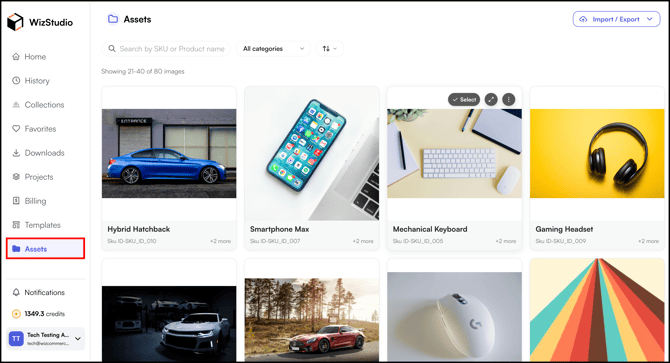
- The product is saved to the Assets section and is ready to reuse for your next image or video.
» Related Articles →
- What is Asset Library (Assets)?
- Build Asset Library with Bulk Upload
- Use Products from Asset Library
- FAQs: Asset Library
Still need help? Reach out to our support team at help@wizcommerce.com.